
Introduction: Antigravity Chat Won’t Respond…
Have you installed Google’s new AI editor “Antigravity,” launched it with excitement, only to find yourself stuck forever with this message in the chat window?
One moment, the agent is currently loading…
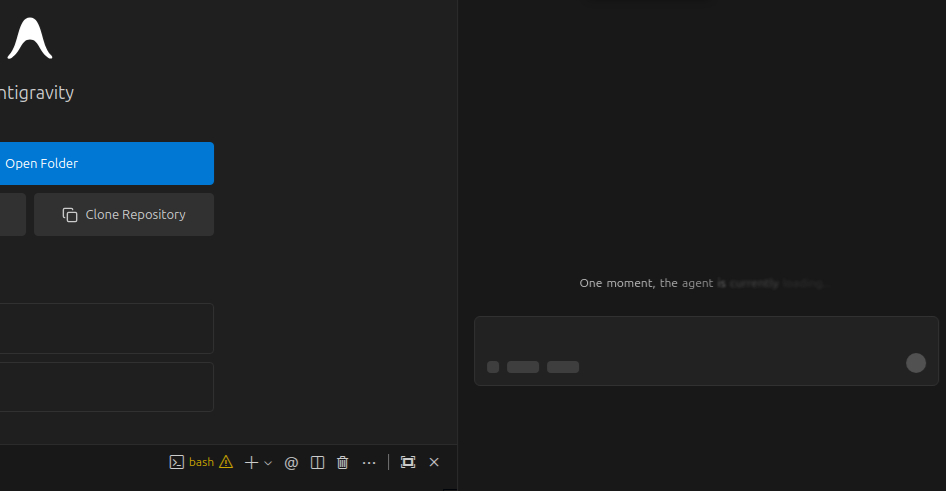
You might think “Maybe it’ll work if I wait a bit?” but even after several hours, nothing changes. Worse yet, the sign-out button in the bottom-left corner doesn’t respond when clicked, and parts of the menu stop functioning.
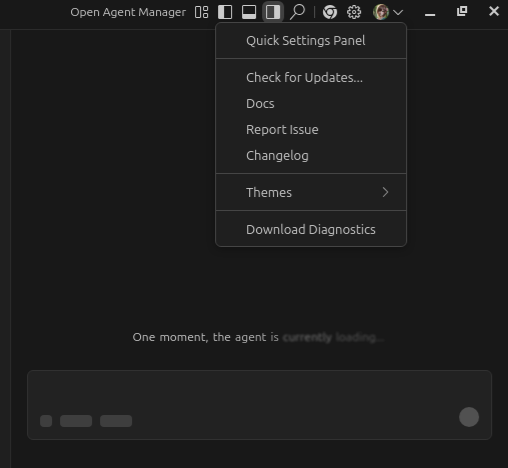
Searching online, you’ll find advice saying “just sign out and log back in to fix it,” but the sign-out button itself is frozen and unclickable, leaving you completely deadlocked.
This article explains the cause of this issue and provides complete step-by-step instructions for a guaranteed recovery on Windows and Linux.
Cause: The Culprit Was “Importing Settings from VS Code”
To identify the cause, I checked the backend logs via Help > Toggle Developer Tools in the menu.
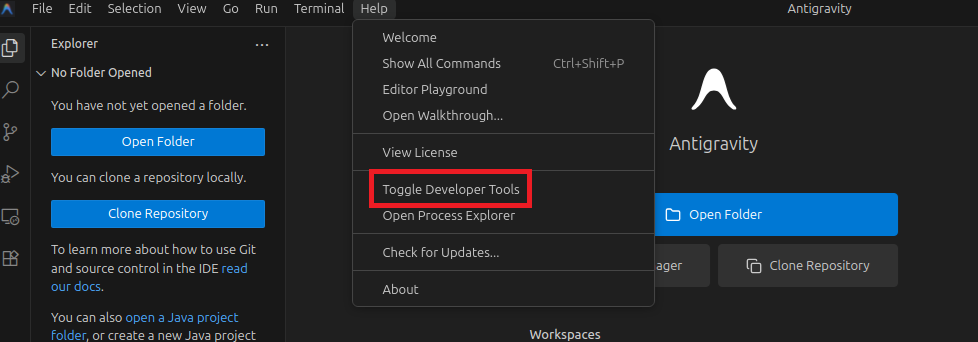
The console was filled with numerous errors. Below is the actual error output from the Ubuntu version.
workbench.desktop.main.js:2797  WARN Via 'product.json#extensionEnabledApiProposals' extension 'ms-vscode.vscode-selfhost-test-provider' wants API proposal 'attributableCoverage' but that proposal DOES NOT EXIST. Likely, the proposal has been finalized (check 'vscode.d.ts') or was abandoned.
warn @ workbench.desktop.main.js:2797
workbench.desktop.main.js:2797  WARN Via 'product.json#extensionEnabledApiProposals' extension 'ms-vsliveshare.vsliveshare' wants API proposal 'notebookCellExecutionState' but that proposal DOES NOT EXIST. Likely, the proposal has been finalized (check 'vscode.d.ts') or was abandoned.
warn @ workbench.desktop.main.js:2797
workbench.desktop.main.js:2797  WARN Via 'product.json#extensionEnabledApiProposals' extension 'ms-python.python' wants API proposal 'contribIssueReporter' but that proposal DOES NOT EXIST. Likely, the proposal has been finalized (check 'vscode.d.ts') or was abandoned.
warn @ workbench.desktop.main.js:2797
workbench.desktop.main.js:2797  WARN Via 'product.json#extensionEnabledApiProposals' extension 'github.vscode-pull-request-github' wants API proposal 'fileComments' but that proposal DOES NOT EXIST. Likely, the proposal has been finalized (check 'vscode.d.ts') or was abandoned.
warn @ workbench.desktop.main.js:2797
workbench.desktop.main.js:2797  WARN Via 'product.json#extensionEnabledApiProposals' extension 'github.copilot-chat' wants API proposal 'chatVariableResolver' but that proposal DOES NOT EXIST. Likely, the proposal has been finalized (check 'vscode.d.ts') or was abandoned.
warn @ workbench.desktop.main.js:2797
workbench.desktop.main.js:2797  WARN Via 'product.json#extensionEnabledApiProposals' extension 'github.copilot-chat' wants API proposal 'lmTools' but that proposal DOES NOT EXIST. Likely, the proposal has been finalized (check 'vscode.d.ts') or was abandoned.
warn @ workbench.desktop.main.js:2797
workbench.desktop.main.js:2797  WARN Via 'product.json#extensionEnabledApiProposals' extension 'ms-python.gather' wants API proposal 'notebookCellExecutionState' but that proposal DOES NOT EXIST. Likely, the proposal has been finalized (check 'vscode.d.ts') or was abandoned.
warn @ workbench.desktop.main.js:2797
workbench.desktop.main.js:2797  WARN Via 'product.json#extensionEnabledApiProposals' extension 'ms-python.vscode-pylance' wants API proposal 'notebookCellExecutionState' but that proposal DOES NOT EXIST. Likely, the proposal has been finalized (check 'vscode.d.ts') or was abandoned.
warn @ workbench.desktop.main.js:2797
workbench.desktop.main.js:2797  WARN Via 'product.json#extensionEnabledApiProposals' extension 'ms-python.debugpy' wants API proposal 'contribIssueReporter' but that proposal DOES NOT EXIST. Likely, the proposal has been finalized (check 'vscode.d.ts') or was abandoned.
warn @ workbench.desktop.main.js:2797
workbench.desktop.main.js:2797  WARN Via 'product.json#extensionEnabledApiProposals' extension 'ms-toolsai.jupyter' wants API proposal 'notebookCellExecutionState' but that proposal DOES NOT EXIST. Likely, the proposal has been finalized (check 'vscode.d.ts') or was abandoned.
warn @ workbench.desktop.main.js:2797
workbench.desktop.main.js:2797  WARN Via 'product.json#extensionEnabledApiProposals' extension 'dbaeumer.vscode-eslint' wants API proposal 'notebookCellExecutionState' but that proposal DOES NOT EXIST. Likely, the proposal has been finalized (check 'vscode.d.ts') or was abandoned.
warn @ workbench.desktop.main.js:2797
workbench.desktop.main.js:2797  WARN Via 'product.json#extensionEnabledApiProposals' extension 'ms-azuretools.vscode-azure-github-copilot' wants API proposal 'lmTools' but that proposal DOES NOT EXIST. Likely, the proposal has been finalized (check 'vscode.d.ts') or was abandoned.
warn @ workbench.desktop.main.js:2797
workbench.desktop.main.js:2797  WARN Via 'product.json#extensionEnabledApiProposals' extension 'ms-vscode.cpptools' wants API proposal 'lmTools' but that proposal DOES NOT EXIST. Likely, the proposal has been finalized (check 'vscode.d.ts') or was abandoned.
warn @ workbench.desktop.main.js:2797
workbench.desktop.main.js:2797  WARN Via 'product.json#extensionEnabledApiProposals' extension 'redhat.java' wants API proposal 'documentPaste' but that proposal DOES NOT EXIST. Likely, the proposal has been finalized (check 'vscode.d.ts') or was abandoned.
warn @ workbench.desktop.main.js:2797
workbench.desktop.main.js:2797  WARN Via 'product.json#extensionEnabledApiProposals' extension 'vscjava.vscode-java-pack' wants API proposal 'lmTools' but that proposal DOES NOT EXIST. Likely, the proposal has been finalized (check 'vscode.d.ts') or was abandoned.
warn @ workbench.desktop.main.js:2797
workbench.desktop.main.js:2797  INFO Started local extension host with pid 4859.
workbench.desktop.main.js:2797   ERR Extension 'google.antigravity' wants API proposal 'cloudCodeUrl' but that proposal DOES NOT EXIST. Likely, the proposal has been finalized (check 'vscode.d.ts') or was abandoned.
error @ workbench.desktop.main.js:2797
workbench.desktop.main.js:2797   ERR Extension 'ms-python.python' appears in product.json but enables LESS API proposals than the extension wants.
package.json (LOSES): contribEditorContentMenu, quickPickSortByLabel, testObserver, quickPickItemTooltip, terminalDataWriteEvent, terminalExecuteCommandEvent, codeActionAI, notebookReplDocument, notebookVariableProvider
product.json (WINS): contribEditorContentMenu, quickPickSortByLabel, portsAttributes, testObserver, quickPickItemTooltip, terminalDataWriteEvent, terminalExecuteCommandEvent, notebookReplDocument
error @ workbench.desktop.main.js:2797
workbench.desktop.main.js:2797   ERR Extension 'ms-python.vscode-python-envs CANNOT USE these API proposals 'terminalShellEnv'. You MUST start in extension development mode or use the --enable-proposed-api command line flag
error @ workbench.desktop.main.js:2797
2workbench.desktop.main.js:2797   ERR [vscode.git]: property `title` is mandatory and must be of type `string` or `object`
error @ workbench.desktop.main.js:2797
2workbench.desktop.main.js:2797   ERR Ignoring clangd.onConfigChanged.forceEnable as clangd.onConfigChanged is "prompt"
error @ workbench.desktop.main.js:2797
workbench.desktop.main.js:6681 Extension Host
workbench.desktop.main.js:6681 Set default auto-select family attempt timeout to 1000ms

workbench.html:1 [GroupMarkerNotSet(crbug.com/242999)!:A0E02E00EC0E0000]Automatic fallback to software WebGL has been deprecated. Please use the --enable-unsafe-swiftshader (about:flags#enable-unsafe-swiftshader) flag to opt in to lower security guarantees for trusted content.
workbench.html:1 [.WebGL-0x2b4c000fa900]GL Driver Message (OpenGL, Performance, GL_CLOSE_PATH_NV, High): GPU stall due to ReadPixels
workbench.html:1 [.WebGL-0x2b4c000fa900]GL Driver Message (OpenGL, Performance, GL_CLOSE_PATH_NV, High): GPU stall due to ReadPixels
workbench.html:1 [.WebGL-0x2b4c000fa900]GL Driver Message (OpenGL, Performance, GL_CLOSE_PATH_NV, High): GPU stall due to ReadPixels
workbench.html:1 [.WebGL-0x2b4c000fa900]GL Driver Message (OpenGL, Performance, GL_CLOSE_PATH_NV, High): GPU stall due to ReadPixels (this message will no longer repeat)
workbench.desktop.main.js:2797   ERR command 'antigravity.refreshMcpServers' not found: Error: command 'antigravity.refreshMcpServers' not found
    at pfi.n (vscode-file://vscode-app/usr/share/antigravity/resources/app/out/vs/workbench/workbench.desktop.main.js:4026:5737)
    at pfi.executeCommand (vscode-file://vscode-app/usr/share/antigravity/resources/app/out/vs/workbench/workbench.desktop.main.js:4026:5669)
error @ workbench.desktop.main.js:2797
workbench.desktop.main.js:2797   ERR command 'antigravity.handleAuthRefresh' not found: Error: command 'antigravity.handleAuthRefresh' not found
    at pfi.n (vscode-file://vscode-app/usr/share/antigravity/resources/app/out/vs/workbench/workbench.desktop.main.js:4026:5737)
    at pfi.executeCommand (vscode-file://vscode-app/usr/share/antigravity/resources/app/out/vs/workbench/workbench.desktop.main.js:4026:5669)
error @ workbench.desktop.main.js:2797
workbench.desktop.main.js:2797  INFO [perf] Render performance baseline is 18ms
After analyzing these logs, I discovered the following:
- During Antigravity installation, I chose “Import settings from VS Code.”
- AI-related extensions like “GitHub Copilot” from the original VS Code were copied over as well.
- However, since Antigravity itself has powerful built-in AI features, they conflicted with Copilot.
- As a result, Antigravity’s core functionality (google.antigravity) crashed, failed to start the AI agent, and froze the entire UI.
In other words, “importing settings with good intentions” actually backfired.
Solution: Manual Cleanup and Reinstallation Steps
A normal uninstall leaves configuration files behind, so you need to manually delete the settings folders using the following steps. This may seem a bit challenging for beginners, but following these instructions will definitely fix the issue.
First, close Antigravity and uninstall it. Then, manually delete the configuration files remaining in the following folders.
For Windows:
Type %USERPROFILE% in the Explorer address bar and press Enter. Delete the folder named .antigravity located there.
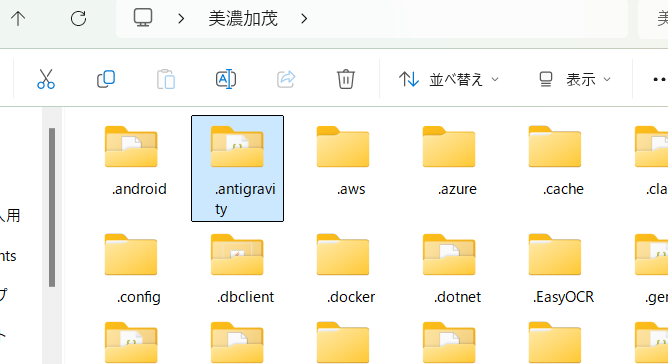
Next, type %APPDATA% in the address bar and press Enter. (This usually navigates to AppData\Roaming) Delete the folder named Antigravity (or Google Antigravity) here as well.
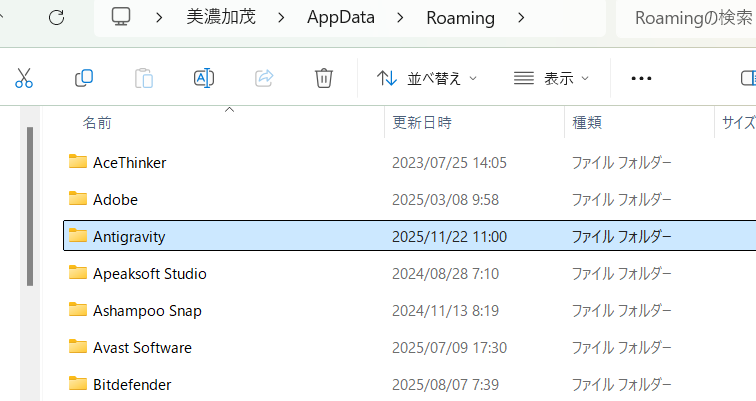
For Linux:
Delete the following directories:
- ~/.antigravity
- ~/.config/Antigravity (or ~/.config/google-antigravity)
Before reinstalling Antigravity, prepare the “source” VS Code. If you reinstall and import settings again as-is, you’ll end up in the same situation.
- Open your regular VS Code.
- Open the Extensions management panel.
- Find “GitHub Copilot” and “GitHub Copilot Chat”, and temporarily uninstall (or disable) them.
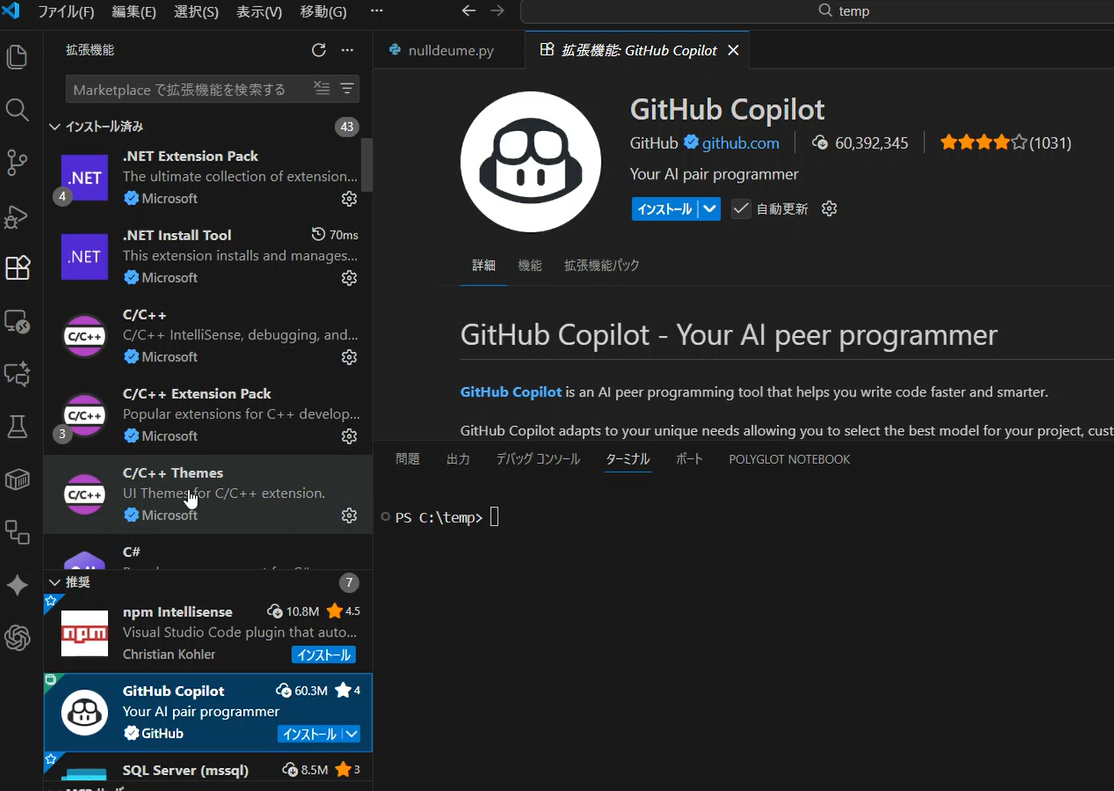
*You can reinstall Copilot in your original VS Code after Antigravity setup is complete.
Preparation is now complete. Reinstall Antigravity and import your settings from VS Code.
Since the problematic extension (Copilot) has been removed, the setup should proceed without errors this time, and you should be able to successfully start chatting with the AI agent (Gemini 3).
Summary
- The cause of Antigravity freezing at “Loading…” is conflict with imported GitHub Copilot and similar extensions.
- If the UI is dead and you can’t sign out, you have no choice but to manually delete the settings folders (.antigravity, etc.).
- To prevent recurrence, remove Copilot from the original VS Code before running the setup.
This information is hardly available online yet. I hope it helps those who feel “stuck” with the same issue.
Note: About Future Updates
The steps described in this article are workarounds for the initial version released recently. Since this issue is caused by “missing conflict checks during settings import” and “insufficient exception handling when extensions crash,” the Google development team will likely release a fix for the installer or the application itself before long.
If future versions add an “option to disable conflicting extensions” to the installer, or allow the app to start in safe mode, the manual deletion described above will no longer be necessary. Please use this as an emergency measure until then.