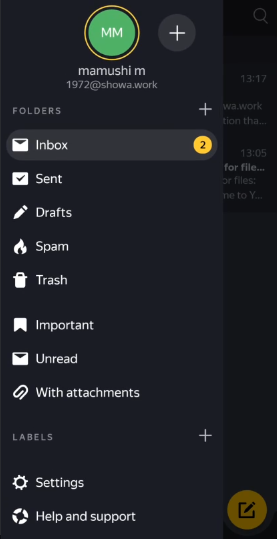
How to Use a Custom Domain Email – Yandex 360 and Its Alternatives
Last updated: September 24, 2025
Introduction – Changes Since 2021
Back in 2021, it was possible to operate a custom domain email completely for free by combining Freenom and Yandex. However, as of 2025, this method is no longer viable. The main changes are as follows:
📌 Important Changes
- Freenom: Stopped new registrations in March 2023 and effectively shut down its service in February 2024.
- Yandex 360: Discontinued its free plan on April 17, 2023 (with exceptions).
- Conclusion: It has become virtually impossible to set up a new, completely free custom domain email.
The Current State of Yandex 360
Major Changes on April 17, 2023
As of April 17, 2023, the free version of Yandex 360 for Business has been disabled. However, there are important exceptions:
- Organizations with 3 or fewer people are not affected
- Up to 3 people, including the administrator.
- Organizations of this size can continue to use the service for free.
- Legacy users can continue to use the service
- Users who migrated from the old “Mail for Domain” or “Yandex.Connect”.
- The existing free tier is maintained (a “divine legacy”!).
Current Pricing Plans (as of September 2025)
Yandex 360 for Business offers three plans:
| Plan | Storage | Key Features | Price Range |
|---|---|---|---|
| Starter | 100GB/user | Basic email, calendar, documents | Cheapest |
| Standard | 1TB/user | Starter + archiving, extended logs, no ads | Mid-range |
| Advanced | 3TB/user | Standard + advanced management, priority support | Most expensive |
*Specific prices vary by region, so please check the official website.
The End of Free Domain Services
The Collapse of Freenom
Freenom was sued by Meta and stopped new registrations in March 2023. Subsequent events:
- March 2023: New registrations stopped.
- February 2024: 12.6 million domains (.tk, .cf, .gq) were shut down and became unresolvable.
- Currently: The service is effectively terminated.
Why did Freenom shut down?
- A hotbed for abuse: Widely used for phishing sites and malware distribution.
- Lawsuit from Meta (Facebook): Sued for negligence in handling abuse.
- A massive impact, with Cloudflare losing 22% of its domains.
Current Free Domain Options
Obtaining a completely free top-level domain (TLD) has become virtually impossible. Instead, we recommend:
- Free subdomain services (e.g., freedns.afraid.org)
- Using a cheap domain (around 500-1,000 JPY per year).
How to Set Up a Custom Domain Email (Paid Version)
Prerequisites
- You own a custom domain (acquired from a registrar like Onamae.com or Cloudflare).
- You have a Yandex account.
- You are willing to subscribe to a Yandex 360 for Business plan (or have an organization of 3 or fewer people).
Detailed Setup Steps
Step 1: Register for Yandex 360 for Business
- Go to https://360.yandex.com/business/
- Log in with your Yandex account (or create a new one).
- Click “Create an organization”.
- Enter an organization name (e.g., “Tanaka Store,” “My Business”).
- Select the size of your organization.
- If you have 3 or fewer people, you may be eligible for the free tier.
Step 2: Add and Verify Your Domain
- Go to the “Domains” section of the admin panel.
- Click “Add domain”.
- Enter your custom domain (e.g., example.com).
- Choose a method to verify domain ownership:
- TXT record (recommended)
- CNAME record
- HTML file
Step 3: Configure DNS Records (Crucial!)
3-1. TXT Record (for ownership verification)
Set this in your domain management panel (e.g., Onamae.com):
Host name: @ (or root domain)
Type: TXT
Value: yandex-verification: xxxxxxxxxxxxxxxx
TTL: 3600 (or default)
Tip for beginners:
- “@” means the root domain.
- The “xxxxxxxxxxxxxxxx” part of the value is a unique code provided by Yandex.
- Please enter it accurately by copying and pasting.
3-2. MX Record (for receiving email)
If you have existing MX records, be sure to delete them before adding this one.
Host name: @
Type: MX
Priority: 10
Value: mx.yandex.net. (the final dot is important!)
TTL: 21600 (Yandex recommended value)
3-3. SPF Record (for sending authentication)
Host name: @
Type: TXT
Value: v=spf1 redirect=_spf.mail.ru
TTL: 3600
3-4. DKIM Signature (optional but highly recommended)
Recommended to avoid being marked as spam:
- Click “DKIM record” in the Yandex admin panel.
- Copy the displayed DKIM record.
- Set it in your domain management panel:
Host name: mail._domainkey
Type: TXT
Value: (long string provided by Yandex)
TTL: 3600
Step 4: Verify Records and Wait for Propagation
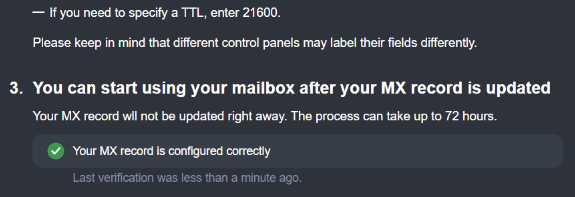
- After configuring DNS, you may need to wait up to 72 hours.
- It usually propagates within 1-24 hours.
- Be patient.
- Click “Verify” in the Yandex admin panel.
- Confirm that all checks turn green.
- TXT record: “Domain ownership confirmed”
- MX record: “Your MX record is configured correctly”
Step 5: Create an Email Address
- Go to the “Employees” (or “Users”) section of the admin panel.
- Click “Add user”.
- Enter the required information:
- Name (Japanese is OK)
- The local part of the email address (the part before the @)
- Password (set a strong one)
- Role (usually “Employee”)
Example:
- Name: Taro Tanaka
- Email address: tanaka@example.com
- Password: (at least 12 characters, with a mix of upper/lower case letters, numbers, and symbols recommended)
Step 6: Configure Your Email Client
You can use the created email address in the following ways:
Webmail (easiest)
- Log in from https://mail.yandex.com
- Username: your full email address
- Password: the password you set
IMAP/SMTP Settings (for Outlook, Thunderbird, etc.)
Incoming server (IMAP):
Server: imap.yandex.com
Port: 993
Security: SSL/TLS
Authentication: Normal password
Outgoing server (SMTP):
Server: smtp.yandex.com
Port: 465
Security: SSL/TLS
Authentication: Normal password (SMTP authentication required)
Smartphone App
- Download the Yandex Mail app for iOS/Android.
- Log in with the account you created.
About the Legacy Free Tier
Conditions That Might Make You a Legacy User
If any of the following apply to you, you may be on the legacy free tier:
- You have been using a custom domain email with Yandex since before April 17, 2023.
- You registered under one of the old service names:
- Yandex.Connect
- Mail for Domain
- Yandex Mail for Domain
Privileges of the Legacy Free Tier
- Continued use for free
- Maintenance of custom domain email functionality
- No user limit (depending on the original contract)
- Important: You cannot go back if you change your plan!
How to Check
- Log in to the Yandex 360 admin panel.
- Check the “Billing” or “Payment” section.
- If you see terms like “Legacy plan” or “Special terms,” you are on the legacy tier.
Note: If you change from a legacy plan to a paid plan, you can never go back to the free plan. Please decide carefully.
Introduction to Alternative Services
Completely Free or Cheap Options
1. Zoho Mail
- Free plan: Up to 5 users, 5GB/user
- Features: No ads, custom domain support
- Limitations: IMAP/POP3 only on paid plans
- URL: https://www.zoho.com/mail/
2. Cloudflare Email Routing (receiving only)
- Completely free
- Features: Forwards email from your custom domain to an existing email address.
- Limitations: Sending requires separate configuration (in combination with Gmail, etc.).
- Setup difficulty: Intermediate
3. MXRoute (cheap paid service)
- Price: From $5/year (during Black Friday sales)
- Features: Unlimited domains, unlimited email addresses
- Storage: Depends on the plan (usually 5GB+)
- Rating: One of the best in terms of cost-performance.
4. Migadu
- Price: From $4/month (discount for annual payment)
- Features: Unlimited domains, unlimited email addresses
- Storage: Depends on the plan
- Support: Excellent
Full-fledged Business Services
Google Workspace
- Price: From 680 JPY/month per user
- Features: Integrated environment with Gmail, Drive, Docs, etc.
- Reliability: Top-level
Microsoft 365
- Price: From 540 JPY/month per user
- Features: Full integration with Outlook and Office products
- For businesses: Exchange server functionality
Summary and Recommendations
The Reality in 2025
- The era of completely free is over
- Free domains are hard to come by due to the demise of Freenom.
- Yandex 360 is also basically a paid service now.
- A cheap domain + a cheap email service is the realistic option
- Domain: 1,000-2,000 JPY per year
- Email service: Free to around 500 JPY per month
Recommended Configurations
Personal/Hobby Use
Domain: Cloudflare Registrar (around $10/year)
Email: Zoho Mail free plan or Cloudflare Email Routing + Gmail
Total cost: Around 1,500 JPY per year
Small Business (3 or fewer people)
Domain: Onamae.com, etc. (around 2,000 JPY per year)
Email: Yandex 360 (free for 3 or fewer people)
Total cost: Around 2,000 JPY per year
Serious Business Use
Domain: A reliable registrar
Email: Google Workspace or Microsoft 365
Total cost: From 680 JPY/month per user
Finally
The dream-like environment of “completely free custom domain email” from 2021 is over, but it is still entirely possible to operate a professional custom domain email with an investment of a few thousand yen per year.
Important points:
- If you insist too much on “free,” you run a high risk of the service being discontinued.
- For business use, the reliability of a paid service is worth the investment.
- If you have a legacy free tier, hold on to it.
Troubleshooting
Common Problems and Solutions
Q: I set up the DNS records, but they won’t verify.
- A: You may need to wait up to 72 hours. Also, check if you forgot the trailing dot “.”.
Q: I can’t send emails.
- A: Check your SPF record and DKIM settings. Make sure SMTP authentication is enabled on port 465.
Q: My emails are being marked as spam.
- A: Set up a DKIM signature and check that your SPF record is correct.
Q: The Yandex admin panel is in English/Russian and I don’t understand it.
- A: Use your browser’s translation feature or look for a language switcher at the bottom of the page.
This article is based on information as of September 23, 2025. Service specifications and prices are subject to change, so please be sure to check the official website for the latest information.
The following is the original article from early 2021. I’m leaving it here to watch its evolution.
You can get a domain for free, but services that offer free email are becoming scarce. So today, I’ll introduce a service that you can use for free email as well. First, let’s get a free domain. However, it has a one-year expiration. If you like it, you can continue to use it. Get your favorite domain at FreeNOM. https://www.freenom.com/ja/index.html I have a domain with Onamae.com, so I can also get one for free from the link in the email.
Once you have a domain, go to a site where you can use a custom domain email for free. I used to do this with ZOHO, but now I’ll use YANDEX, which is famous in Russia. It comes with various services such as cloud storage, and it’s convenient with no ads. First, sign up at the URL below.
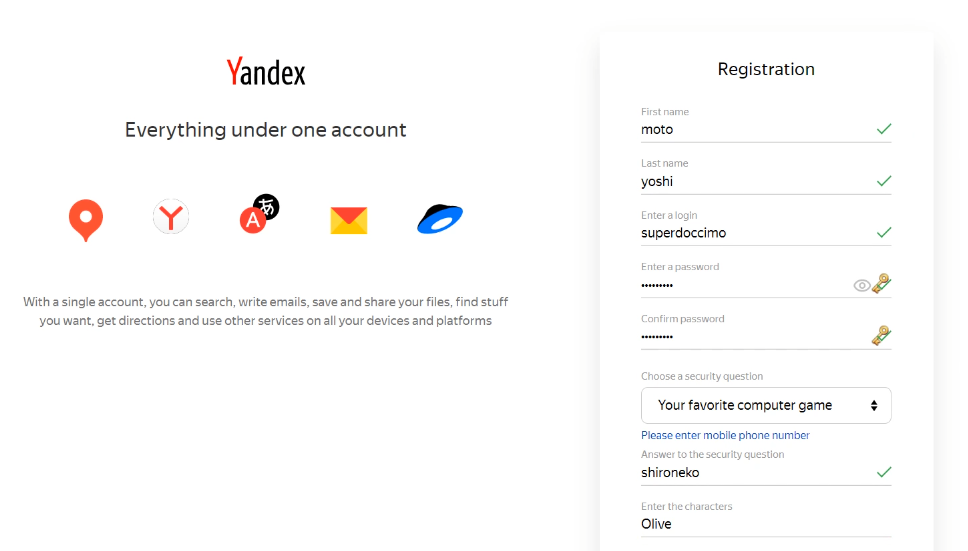
After that, you can go to another URL and view this site while logged in.
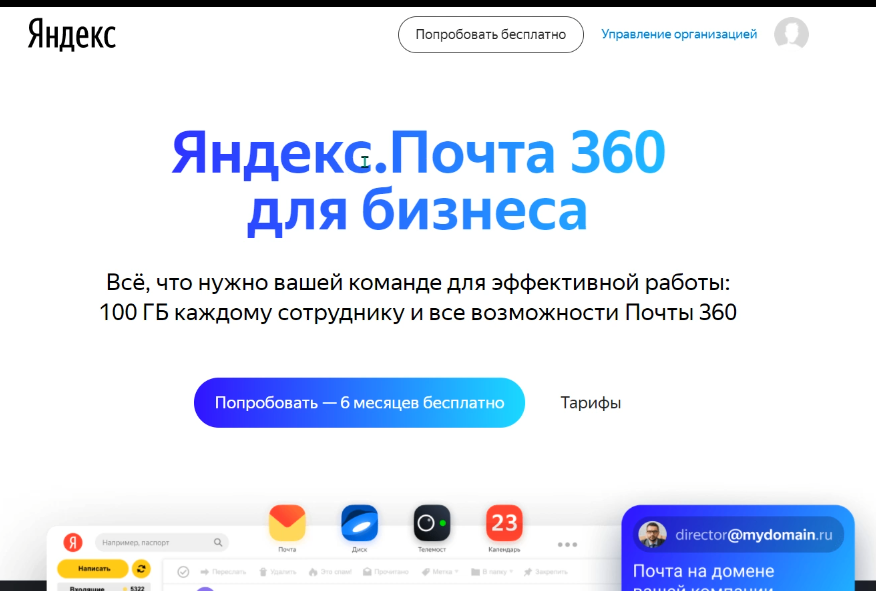
https://business.yandex.ru/mail360
I lived in Russia for about a year, but I’ll translate it into Japanese and click the link at the bottom of the page. The plans will be displayed, so select the one on the far left that allows you to use a domain email for free.
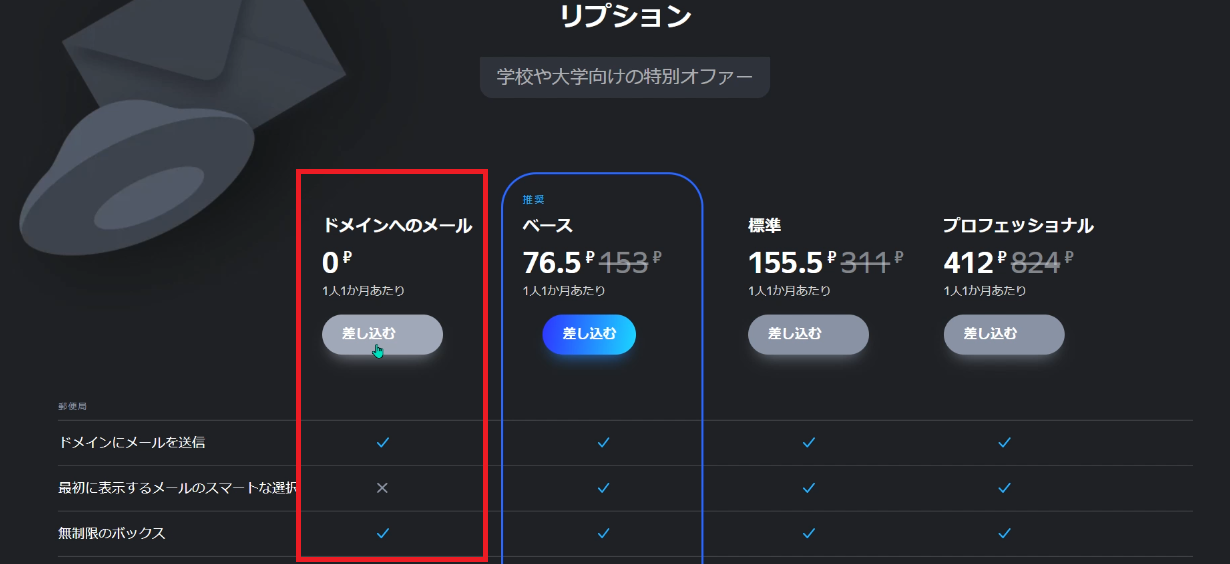
If something is displayed, agree to it and proceed. Let’s proceed with the domain settings according to the wizard.
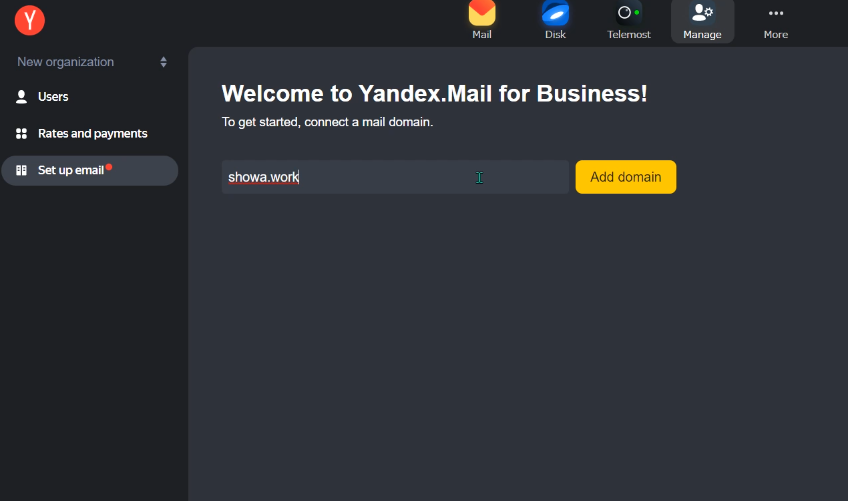
As you enter the domain you acquired and work through the process, the TXT and MX records will be displayed, so set them up with your domain provider.
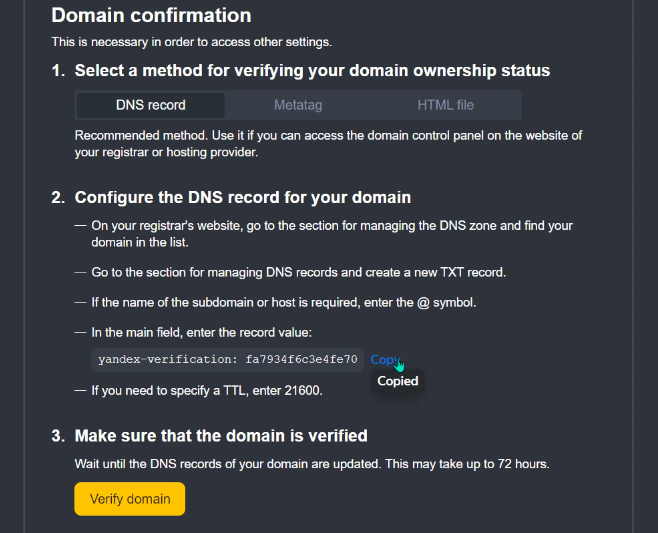
You’ll write a TXT record, and both Onamae and Freenom have pages for setting it up.
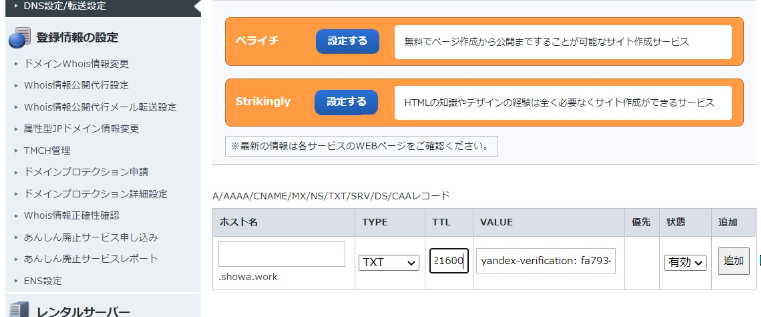
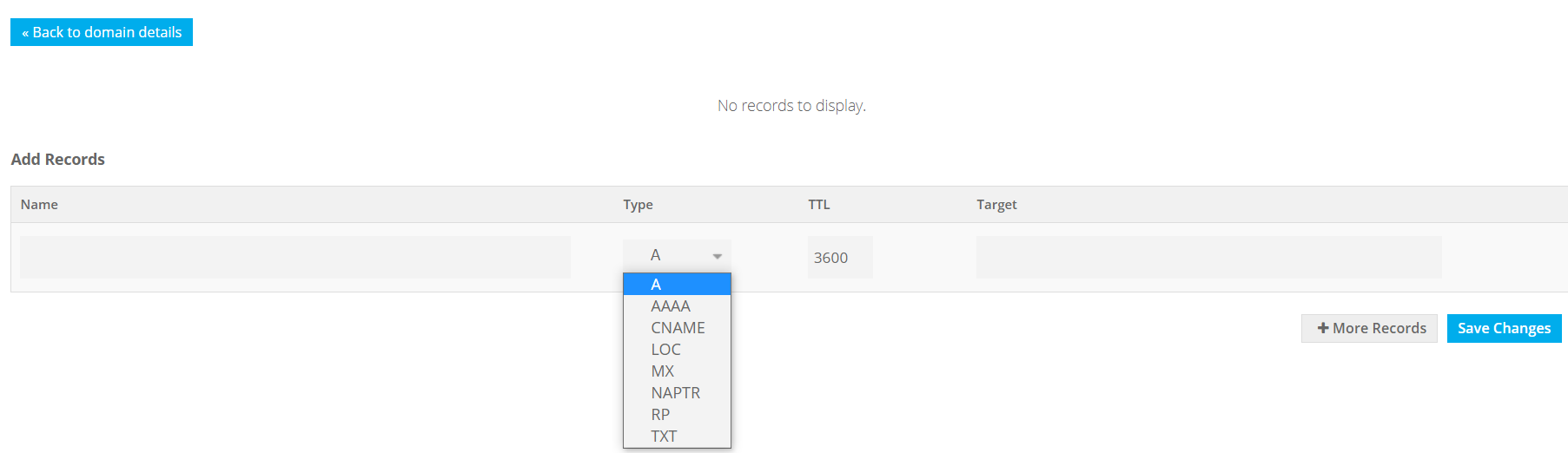
Also set the MX record specified by YANDEX. It says to set the TTL value to 21600. The DKIM value is also listed, but it is not required. It seems that setting DKIM can prevent email spoofing, so I set it up.
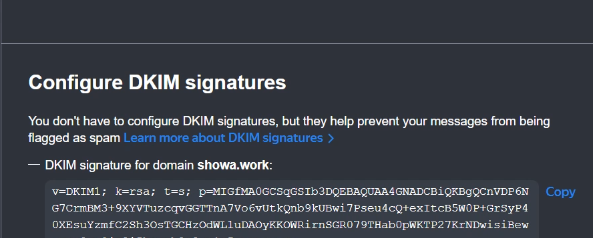
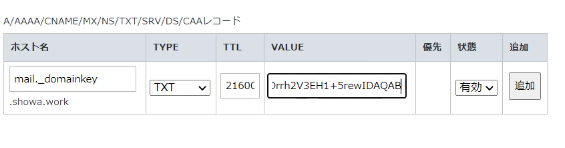
After enough time has passed, test the MX records and so on on the YANDEX side. If the TXT record says “Domain ownership confirmed” and the MX record says “Your MX record is configured correctly”, then you have succeeded.
Now let’s create a custom domain email address. You can do this by adding a user. You can now use your acquired domain for your email address.
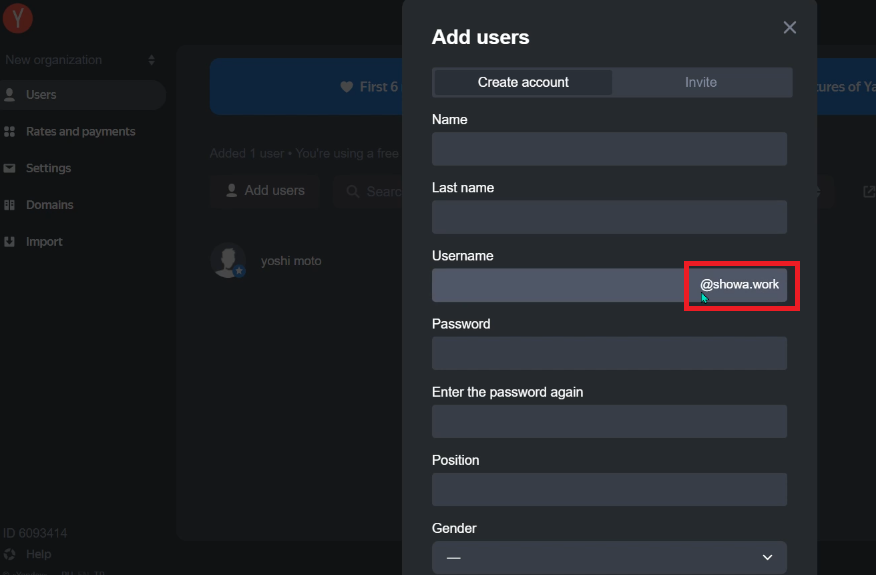
Also decide on a name and password. Then log out once and log in with the user information you just created. When you look at your email, you’ll see that it is indeed a custom domain email. There is also a smartphone app, so you can check your email on the go.